Physical Address
304 North Cardinal St.
Dorchester Center, MA 02124
Physical Address
304 North Cardinal St.
Dorchester Center, MA 02124
Yes, my hoarding problem is also prevalent in my digital space. I’m not proud of it, but it is what it is.

I’m guilty of having hundreds of Chrome tabs and the occasional twenty Safari tabs open on my Mac Mini, iPad Pro x2, and phone. Because if I don’t leave the tab open, it’s forever gone in my mind.

I know I can bookmark it or save videos to Watch It Later, but given my ability to forget in 3 seconds (quicker than a goldfish), once it’s out of sight, it’s out of my mind. Not to mention the amount of bookmarks I’ve accumulated over the past 20 years.
Fun Fact: Did you know once you go past 99 tabs, the Chrome app stops counting and just shows a smiley face? Well, my mobile Chrome is always smiling at me.
My bro-in-law, who happens to be in IT, is absolutely horrified by how many tabs I have open and how much system resources it takes up. The other day my Mac popped up an error telling me it ran out of memory. And lo and behold, Google Chrome was using about 8GB of the 8GB RAM I have.

So — I have a problem with digital hoarding, and I needed an alternative solution. In comes Arc Browser. One of the YouTubers I follow – Christopher Lawley, did a short tutorial on its capabilities and I was sold. I downloaded it straight away to test it out.
(This is the bit for people who don’t want to read my whole life story)
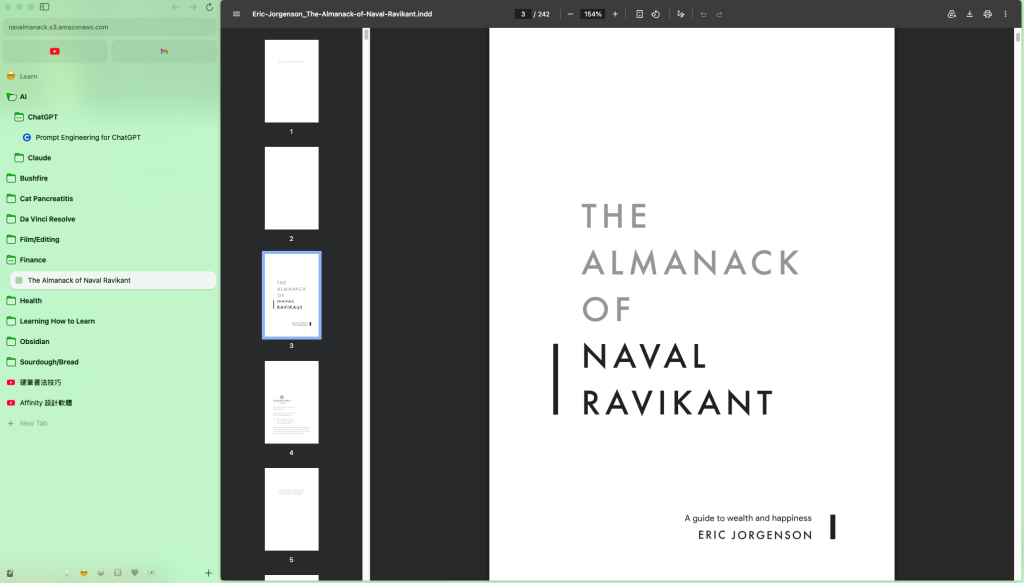
It’s Clean, Colourful, and lets me Compartmentalise my chaos into workspaces — kind of like giving a kid (me) different boxes to put different toys in, rather than having it all strewn across the playroom floor. Yes, inside those boxes is still chaos, but on the surface it’s clean, and my brain likes it.
I set up different spaces for different purposes and colour coded them — one for fun, one for creating, one for business ideas, one for learning, and I even made one for our wedding, which really helped organise the things we had to look at like venues, gifts, photographers, etc.
Gotta be honest though, the space I spend the most time in is the Fun Space — watching YouTube, Bilibili, Thai GL dramas, and K-pop stuff. If I used a time-tracking extension alongside Arc, I’d probably find out exactly how unproductive I’ve been.

It’s forgiving – I accidentally closed a tab, gasped, and intuitively pressed Cmd+Z. The closed tab came back immediately. If I was in chrome I’d have to do the Cmd +Shift +T combo, which requires more fingers.
It’s easy – Bookmarking is as simple as moving the tab up over the dividing line. And if I chance upon something while I’m doomscrolling relaxing in my Fun Times space that belongs to a different space (e.g. New AI tools to learn or new restaurants to try or fun touristy spots), I can quickly bookmark it and right-click to move the tab to the corresponding workspace without leaving the Fun Times space.
Tab renaming – Arc does a good job of auto-renaming tabs according to their content, and you can also rename manually. Because I use both Mandarin and English tabs, it sometimes gets overzealous and converts the tab name into a different language — not the end of the world, but worth knowing.
(A lot has happened since I first started drafting this review two years ago, so here’s how things have changed.)
Chrome now has a similar feature called Tab Groups, and I believe Safari has something similar too. That said, I still prefer the look and feel of Arc — it’s just a pity the iPad gap never got filled.
Because of that gap, I did some spiraling googling and found a similar-looking browser called Beam. I haven’t tried it as not sure about paying $13 for an iPad app I can’t trial first — but it does have really good reviews, so it might be worth looking into if the no-iPad-app thing bothers you as much as it bothers me.
Also since Po and I are now happily married, I’ve archived all the wedding-planning stuff and repurposed that space for romantic date ideas and fun things we can do together instead.
I have barely scratched the surface of what the ArcBrowser is capable of in terms of customisation.
There are heaps more functions that I find really interesting but haven’t had a personal use for it. For example – Boosts – where you are able to customise the appearance of any website and ‘zap’ the things you don’t like away.
Even though I’m only using a fraction of what it’s capable of, it’s something I have enjoyed using daily. I can easily find things in their corresponding spaces instead of clicking through 99+ chrome tabs/windows to eventually not find what I wanted to go back to.
For example, when I go into my Learning Space, I can pick a topic or an article that I’ve bookmarked previously to work/read through, and not be distracted by the other bookmarks of videos or online fun stuff that lives in the Fun Times space.
Did ArcBrowser fix my digital hoarding issue? No. But it did organise my chaos beautifully and made me more productive…well at least I feel more productive?
